
The Clock That Knows What Day It Is
For someone with dementia, knowing the day, the date, and what comes next is not a small thing. The Roxicosly Digital Calendar Clock was built to answer exactly those questions, quietly and without any effort from the person looking at it.
Relevant stages
Most useful at Stages 1 to 5. At Stage 6, simpler sensory comfort tends to take precedence over clock-based orientation.
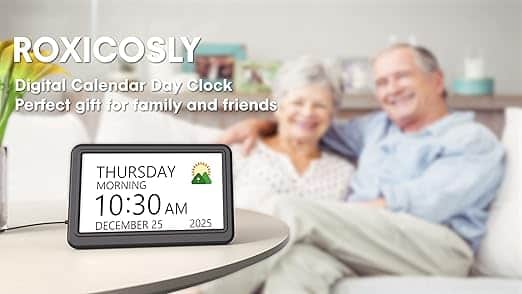
One of the earliest and most disorienting experiences of dementia is losing track of time. Not in the way the rest of us lose track on a slow Sunday afternoon, but genuinely and repeatedly. What day is it. Is it morning or evening. Was that appointment today or yesterday. These are not trivial confusions. For a person whose world is already becoming harder to navigate, not knowing where they are in the day adds a layer of anxiety that sits beneath everything else and makes everything else harder.
Most clocks answer one of these questions. A good dementia clock answers all of them at once, in large clear text, without being asked. The Roxicosly does that, and then adds something that most carers do not expect when they first encounter it: the photograph.
When a familiar face appears on the same screen that shows the time and the day, something useful happens. The clock becomes a companion rather than a device. It earns its place on the bedside table or the living room shelf not just as a practical tool but as a small, quiet source of comfort. Both things matter. Neither one would be quite enough on its own.
Why it works
Routine and predictability are among the most powerful supports available to someone with dementia. The brain's procedural memory, which holds the shape of a familiar day, remains more intact than the memory that tracks what actually happened in it. A clock that consistently shows the day, the date, and the time anchors the person in the structure of their day even when conversational recall has become unreliable. Reminders that arrive at the same time each day, with a familiar sound and a clear icon, reinforce that structure without requiring anyone to be in the room to prompt it. The result is a quieter, less anxious day for the person living with dementia, and a slightly less exhausting one for the person caring for them.
How to use it
Set it up once and position it where it will be seen without effort. A bedside table works well for morning orientation. A shelf at eye level in the living room works well through the day. The screen is seven inches, bright enough to read from across the room, and the auto-dimming adjusts itself for day and night without anyone needing to touch it. The sun and moon icons that shift with the time of day are a particularly useful feature for anyone who becomes confused about whether it is morning or evening, which is one of the more common and distressing experiences at Stages 3 and 4.
The reminders are where most carers find the greatest practical value. Up to twenty can be set, covering medication, daily activities, visits, entertainment, and birthdays, each with its own icon so the message is immediately clear even before the text is read. A reminder that says "Time for your tablets" in large text, accompanied by a medication icon and a gentle chime at the same time each morning, becomes part of the rhythm of the day in a way that a verbal prompt from a carer does not always manage. It is consistent, it is calm, and it does not carry the slight edge of anxiety that a reminder from another person sometimes, entirely unintentionally, does.
For the photograph function, load family photographs onto a USB drive or SD card and insert it into the back of the clock. The images cycle on screen when the clock is not displaying a reminder. Keep the selection to faces and places the person knows well and associates with warmth. This is not the place for unfamiliar grandchildren or group photographs where the person cannot locate themselves. A handful of the right photographs, chosen with care, will do more than a large collection chosen in haste.
The battery backup is worth noting for carers. In the event of a power cut, the clock retains all its settings. There is no reset required, no confusion when power is restored, no moment where the clock shows the wrong time and the wrong day and quietly undoes several weeks of settled routine.
Across the stages
Stages 1 and 2
The clock supports independence. Knowing the day and the time without needing to ask is a small but significant dignity, and the medication reminders reduce the cognitive load of managing a routine that is still largely self-directed.
Stage 3
When home care is becoming more complex and the days more unpredictable, the reminder system becomes a practical support for the carer as much as for the person. Medication times, activity prompts, and visit reminders take some of the management weight off whoever is in the room.
Stages 4 and 5
The clock travels into the care home. A familiar clock on a familiar shelf, showing the same icons and the same photographs it has always shown, is one of the simplest and most effective ways of bringing continuity into a new environment. Care home staff, once shown how the reminders work, can incorporate them into the person's daily care plan. The photograph function, in a care home setting, is particularly valuable during the hours when family are not present.
Things to consider
The clock is mains powered with battery backup for settings only. It will not run on batteries alone, so a power socket near the chosen location is needed. The SD card and USB drive for photographs are not included, nor are the AAA batteries for the backup function. These are small additions worth picking up at the same time. The screen is not a touchscreen, which is actually an advantage for most dementia sufferers since accidental touches cannot disrupt the display. Setup is done through physical buttons, which a carer will need to manage at the outset, but once set the clock requires very little ongoing attention.
Products worth knowing about
These are products selected because they are well-reviewed, straightforwardly available, and suited to the needs described in this article. There is no obligation to buy anything. The links below are affiliate links, which means DementiaCareChoices.com earns a small commission on any purchase made through them, at no extra cost to you. This is how we pay for the running and upkeep of the site.
Roxicosly Digital Calendar Alarm Clock
The product this article is built around. Available in multiple colour themes to suit the room it will live in, with full reminder and photograph functionality.
USB flash drive for photograph storage
The simplest way to load images onto the clock. A fast drive that is more than sufficient for a rotating selection of family photographs (Amazon Basics range).
AAA rechargeable batteries
Worth using in the backup slot to avoid having to replace them repeatedly. Any standard rechargeable set will work (Amazon Basics range).
One of the things carers consistently say, looking back, is that they wish they had made more of the ordinary moments. The days when the right prompt arrived at the right time, and the person they were caring for sat a little straighter, or smiled, or said a name they had not said in weeks. A clock that holds the shape of the day, and shows a face worth remembering while it does it, creates the conditions for more of those moments. It cannot guarantee them. Nothing can. But it does what the best things in this guide do: it reduces the noise, and makes room for something worth finding.
They're still in there, behind the wall.
A song, a scent, a touch. That's all.
Dementia care gifts that help
The Thoughtful Gift That Makes a Difficult Day Easier
The things that make the greatest difference to someone living with dementia are rarely the most obvious ones. They are the things that ease the day — that give a carer a moment to breathe, or give the person they care for a moment of calm or quiet joy. Every item here was chosen because it works, and because it reduces stress for everyone in the room.